AI-Powered ITSM & Device Management
Unifying ITSM and Endpoint Management with a Single AI-Powered Agent.
Admin Console
Deprecated: Using null as an array offset is deprecated, use an empty string instead in /home/a2787f47/public_html/blog/wp-includes/class-wp-block-type-registry.php on line 168
Deprecated: Using null as an array offset is deprecated, use an empty string instead in /home/a2787f47/public_html/blog/wp-includes/class-wp-block-type-registry.php on line 168
Deprecated: Using null as an array offset is deprecated, use an empty string instead in /home/a2787f47/public_html/blog/wp-includes/class-wp-block-type-registry.php on line 168
Deprecated: Using null as an array offset is deprecated, use an empty string instead in /home/a2787f47/public_html/blog/wp-includes/class-wp-block-type-registry.php on line 168
Deprecated: Using null as an array offset is deprecated, use an empty string instead in /home/a2787f47/public_html/blog/wp-includes/class-wp-block-type-registry.php on line 168
Deprecated: Using null as an array offset is deprecated, use an empty string instead in /home/a2787f47/public_html/blog/wp-includes/class-wp-block.php on line 295
Deprecated: Using null as an array offset is deprecated, use an empty string instead in /home/a2787f47/public_html/blog/wp-includes/class-wp-block-type-registry.php on line 168
Deprecated: Using null as an array offset is deprecated, use an empty string instead in /home/a2787f47/public_html/blog/wp-includes/class-wp-block-type-registry.php on line 168
Deprecated: Using null as an array offset is deprecated, use an empty string instead in /home/a2787f47/public_html/blog/wp-includes/class-wp-block-type-registry.php on line 168
Deprecated: Using null as an array offset is deprecated, use an empty string instead in /home/a2787f47/public_html/blog/wp-includes/class-wp-block-type-registry.php on line 168
Deprecated: Using null as an array offset is deprecated, use an empty string instead in /home/a2787f47/public_html/blog/wp-includes/class-wp-block-type-registry.php on line 168
Understanding the Admin Console
The Admin Console is a centralized IT management platform that allows administrators to monitor, control, and automate IT support and maintenance tasks across multiple devices. It plays a crucial role in system health monitoring, troubleshooting, and self-healing automation.
What is the Admin Console?
The Admin Console is a web-based dashboard that provides IT administrators with real-time visibility and control over an organization’s IT infrastructure. It allows them to:
- Monitor system performance & compliance across all devices.
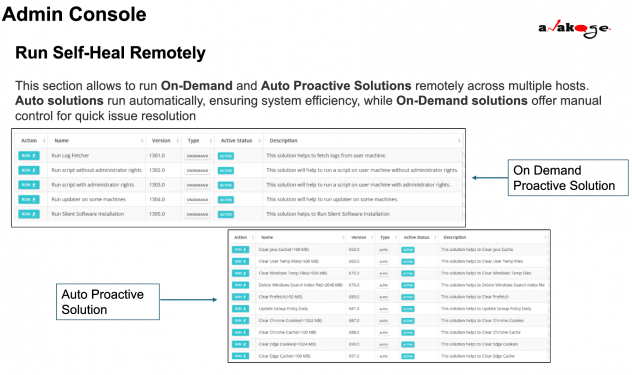
- Deploy self-heal solutions to fix issues remotely.
- Automate IT maintenance to reduce manual troubleshooting.
- Track execution logs and device analytics for proactive IT management.
Why is it important?
Reduces IT downtime by automating issue resolution.
Provides remote control over multiple devices.
Enhances operational efficiency with proactive system monitoring.
Key Features & Capabilities of the Admin Console
| Feature | Description | Benefit |
|---|---|---|
| Self-Heal Execution | Run automated or on-demand fixes remotely. | Reduces IT workload & user disruptions. |
| Device Analytics & Health Monitoring | Track hardware/software health, boot time, antivirus, storage, etc. | Helps identify system failures before they happen. |
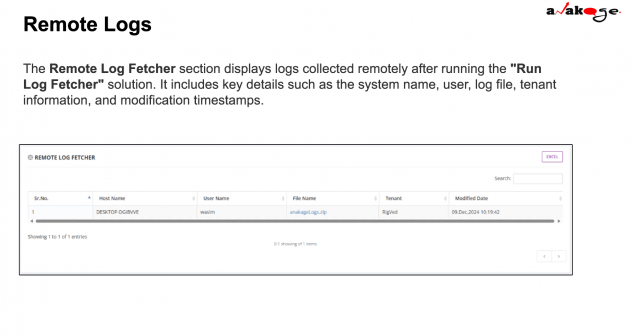
| Remote Log Fetching | Fetch system logs from remote devices. | Aids in troubleshooting without manual intervention. |
| Patch Management | Monitor Windows updates & KB articles. | Ensures security compliance & system stability. |
| Auto Proactive & On-Demand Solutions | Automate routine fixes or execute manual repairs. | Increases IT efficiency & speeds up issue resolution. |
| Compliance Monitoring | Enforce IT policies for software, security, and performance. | Prevents unauthorized software & maintains device integrity. |
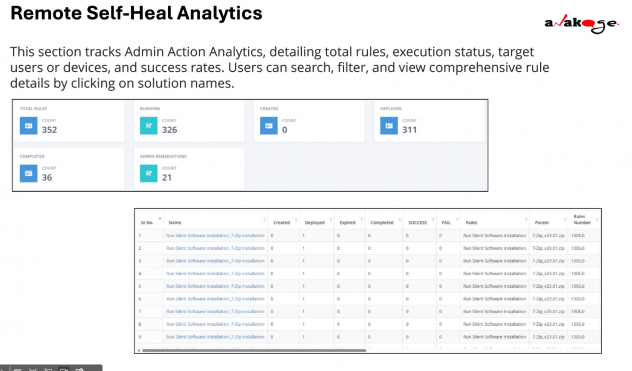
| Execution Logs & Reports | Track execution success rates & failures. | Provides data-driven insights for troubleshooting. |
Key Takeaways:
Self-Heal Automation minimizes manual troubleshooting.
Real-time monitoring improves system performance & security.
Remote execution ensures faster issue resolution across multiple devices.
Managing IT Infrastructure with the Admin Console
The Admin Console helps IT teams effectively manage IT assets, automate fixes, and optimize system performance.
Key IT Management Tasks Using the Admin Console
Monitoring Device Performance & Health
- Track CPU, RAM, storage, and boot time analytics.
- Identify slow-performing systems for proactive maintenance.
Ensuring Compliance & Security
- Monitor antivirus status, Windows updates, and patch compliance.
- Detect and block unauthorized software installations.
Automating IT Maintenance Tasks
- Schedule self-heal solutions for routine fixes.
- Apply Auto Proactive solutions to enforce security policies.
Remote Troubleshooting & Log Analysis
- Fetch logs from devices for faster root cause analysis.
- Execute on-demand fixes without user intervention.
Tracking Execution & Generating Reports
- View execution logs of self-heal solutions.
- Generate compliance reports & IT performance dashboards.
Example Use Case:
A company experiences slow system performance across multiple devices.
Using the Admin Console, IT teams:
- Identify affected devices via performance logs.
- Deploy a Self-Heal fix to optimize boot time and clear junk files.
- Monitor execution logs to ensure successful resolution.