AI-Powered ITSM & Device Management
Unifying ITSM and Endpoint Management with a Single AI-Powered Agent.
Admin Console
Deprecated: Using null as an array offset is deprecated, use an empty string instead in /home/a2787f47/public_html/blog/wp-includes/class-wp-block-type-registry.php on line 168
Deprecated: Using null as an array offset is deprecated, use an empty string instead in /home/a2787f47/public_html/blog/wp-includes/class-wp-block-type-registry.php on line 168
Deprecated: Using null as an array offset is deprecated, use an empty string instead in /home/a2787f47/public_html/blog/wp-includes/class-wp-block-type-registry.php on line 168
Deprecated: Using null as an array offset is deprecated, use an empty string instead in /home/a2787f47/public_html/blog/wp-includes/class-wp-block-type-registry.php on line 168
Deprecated: Using null as an array offset is deprecated, use an empty string instead in /home/a2787f47/public_html/blog/wp-includes/class-wp-block-type-registry.php on line 168
Deprecated: Using null as an array offset is deprecated, use an empty string instead in /home/a2787f47/public_html/blog/wp-includes/class-wp-block.php on line 295
Deprecated: Using null as an array offset is deprecated, use an empty string instead in /home/a2787f47/public_html/blog/wp-includes/class-wp-block-type-registry.php on line 168
Deprecated: Using null as an array offset is deprecated, use an empty string instead in /home/a2787f47/public_html/blog/wp-includes/class-wp-block-type-registry.php on line 168
Deprecated: Using null as an array offset is deprecated, use an empty string instead in /home/a2787f47/public_html/blog/wp-includes/class-wp-block-type-registry.php on line 168
Deprecated: Using null as an array offset is deprecated, use an empty string instead in /home/a2787f47/public_html/blog/wp-includes/class-wp-block-type-registry.php on line 168
Deprecated: Using null as an array offset is deprecated, use an empty string instead in /home/a2787f47/public_html/blog/wp-includes/class-wp-block-type-registry.php on line 168
Introduction to Remote Solution Analytics
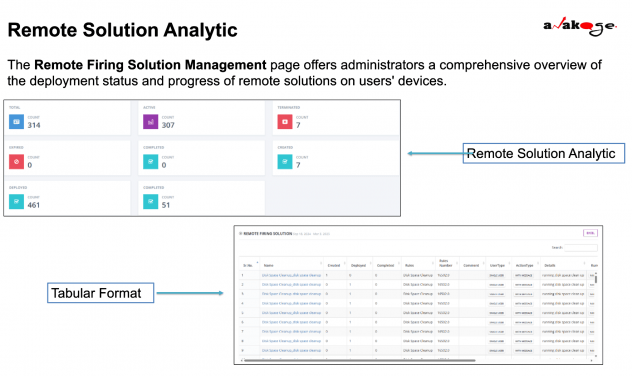
The Remote Solution Analytics Module provides IT administrators with a comprehensive overview of remote solution deployments, execution statuses, and system-wide efficiency. This module enables IT teams to monitor active deployments, track solution performance, and optimize remote executions.
Overview of Remote Solution Deployment
The Remote Firing Solution Management Page allows IT teams to:
- Monitor solution execution across multiple devices.
- Track solution deployment metrics in real-time.
- Identify and resolve deployment failures.
Importance of Monitoring Remote Solutions
- Ensures solutions execute as expected without disruptions.
- Identifies failed, expired, or terminated solutions for troubleshooting.
- Improves system efficiency by preventing redundant executions.
Key Metrics and Performance Indicators
| Metric | Definition |
|---|---|
| Total Solutions | Overall number of remote solutions initiated. |
| Active Solutions | Number of solutions currently executing. |
| Terminated Solutions | Solutions stopped before completion. |
| Expired Solutions | Solutions that exceeded their validity period. |
| Created Solutions | Newly created solutions awaiting deployment. |
| Deployed Solutions | Solutions successfully sent to user devices. |
| Completed Solutions | Solutions fully executed and marked as completed. |
2: Understanding Deployment Metrics
Tracking Total, Active, Terminated, and Expired Solutions
Total Solutions: Displays the total number of initiated remote solutions.Active Solutions: Indicates ongoing executions across user devices.Terminated Solutions: Shows solutions that were manually stopped or failed.
Expired Solutions: Solutions that exceeded their validity period without execution.
Monitoring Created, Deployed, and Completed Solutions
Created Solutions: Solutions that were configured but not yet deployed.
Deployed Solutions: Solutions that were successfully sent to user devices.
Completed Solutions: Solutions that finished execution without errors.
Reviewing Solution-Specific Details
Each remote solution includes:
- Solution Name: Identifies the purpose of the solution.
- Creation Date: Timestamp of when the solution was configured.
- Deployment Status: Indicates Active, Completed, or Expired status.
- User Type: Shows the target audience (e.g., specific groups or all users).
- Action Type: Defines execution mode (e.g., WITH MESSAGE).
- Validity: Specifies the expiry period for execution.
3: Managing and Searching Remote Solutions
Utilizing Search Functions to Filter Solutions
- Search by Solution Name, Date, Status, or Action Type.
- Quickly locate specific solution executions for analysis.
Analyzing Deployment Status and Execution Progress
- Tracks which solutions have executed successfully and which failed.
- Helps IT teams identify performance trends and common execution issues.
Identifying and Resolving Deployment Issues
If solutions fail to execute, check for:
- Device connectivity issues.
- User intervention requirements (e.g., restart required).
- Conflicting active solutions.
4: Solution Termination and Optimization
Understanding the Role of the “Terminate” Button
- The Terminate button stops a scheduled solution before it executes.
- Once the validity period expires, termination is no longer possible.
When and Why to Terminate a Solution
- Prevent Unnecessary Execution: If a solution is no longer needed.
- Avoid Disruptions: If a solution could interfere with other tasks.
- Save System Resources: Stops redundant executions.