AI-Powered ITSM & Device Management
Unifying ITSM and Endpoint Management with a Single AI-Powered Agent.
Patch
Deprecated: Using null as an array offset is deprecated, use an empty string instead in /home/a2787f47/public_html/blog/wp-includes/class-wp-block-type-registry.php on line 168
Deprecated: Using null as an array offset is deprecated, use an empty string instead in /home/a2787f47/public_html/blog/wp-includes/class-wp-block-type-registry.php on line 168
Deprecated: Using null as an array offset is deprecated, use an empty string instead in /home/a2787f47/public_html/blog/wp-includes/class-wp-block-type-registry.php on line 168
Deprecated: Using null as an array offset is deprecated, use an empty string instead in /home/a2787f47/public_html/blog/wp-includes/class-wp-block-type-registry.php on line 168
Deprecated: Using null as an array offset is deprecated, use an empty string instead in /home/a2787f47/public_html/blog/wp-includes/class-wp-block-type-registry.php on line 168
Deprecated: Using null as an array offset is deprecated, use an empty string instead in /home/a2787f47/public_html/blog/wp-includes/class-wp-block.php on line 295
Deprecated: Using null as an array offset is deprecated, use an empty string instead in /home/a2787f47/public_html/blog/wp-includes/class-wp-block-type-registry.php on line 168
Deprecated: Using null as an array offset is deprecated, use an empty string instead in /home/a2787f47/public_html/blog/wp-includes/class-wp-block-type-registry.php on line 168
Deprecated: Using null as an array offset is deprecated, use an empty string instead in /home/a2787f47/public_html/blog/wp-includes/class-wp-block-type-registry.php on line 168
Deprecated: Using null as an array offset is deprecated, use an empty string instead in /home/a2787f47/public_html/blog/wp-includes/class-wp-block-type-registry.php on line 168
Deprecated: Using null as an array offset is deprecated, use an empty string instead in /home/a2787f47/public_html/blog/wp-includes/class-wp-block-type-registry.php on line 168
What is Patch Management?
Patch management refers to the process of managing updates for software applications and operating systems. These updates, often referred to as “patches,” are released by software vendors to fix vulnerabilities, improve functionality, and enhance security. Effective patch management helps protect systems from cyber threats and ensures that software operates smoothly.
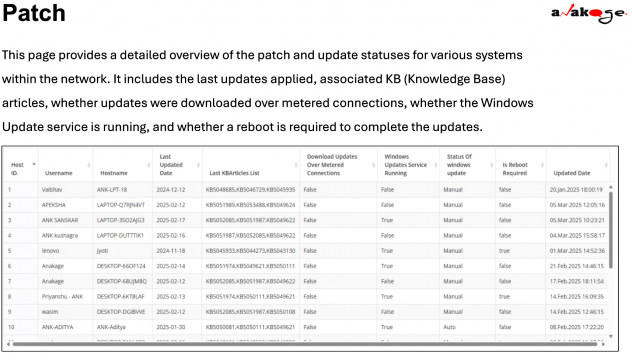
Here’s the information presented in a tabular format for clarity:
| Key Component | Description |
|---|---|
| Host ID | A unique identifier for the system being tracked, allowing you to distinguish between different devices in the network. |
| Username | The name of the user associated with the system, which helps identify who is using the device. |
| Hostname | The name assigned to the system, used to identify it on the network. |
| Last Updated Date | The date when the last set of updates was applied to the system, providing insight into how current the system is. |
| Last KB Articles List | A list of Knowledge Base (KB) articles corresponding to the recent updates applied, helping users understand what changes or fixes have been implemented. |
| Download Updates Over Metered Connections | Indicates whether updates were downloaded over a metered connection (True or False), important for users with limited data plans. |
| Windows Update Service Running | States whether the Windows Update service is currently running on the system, which is necessary for automatic updates. |
| Status of Windows Update | The current state of Windows updates (e.g., Manual, Automatic), indicating how updates are managed on the system. |
| Is Reboot Required | Indicates whether a system reboot is required to complete the updates, crucial for planning maintenance and minimizing downtime. |
| Updated Date | The date when the data about the system’s up |
Windows Update Service and Reboot Requirements
Understanding Windows Update Service States
The Windows Update service can be in different states, such as running, stopped, or disabled. Understanding these states is crucial for ensuring that updates are applied correctly.
Configuring Windows Update Settings
Windows Update settings can be configured to determine how and when updates are applied. This includes options for automatic updates, manual updates, and scheduling.
Reboot Requirements and System Stability
Many updates require a system reboot to complete the installation process. Understanding when a reboot is necessary helps in planning maintenance and minimizing disruption to users.
Managing Updates Over Metered Connections
For users on metered connections, it’s important to manage how updates are downloaded. Configuring settings to avoid large downloads over limited data plans can help prevent unexpected charges.