AI-Powered ITSM & Device Management
Unifying ITSM and Endpoint Management with a Single AI-Powered Agent.
Blacklist Software
Deprecated: Using null as an array offset is deprecated, use an empty string instead in /home/a2787f47/public_html/blog/wp-includes/class-wp-block-type-registry.php on line 168
Deprecated: Using null as an array offset is deprecated, use an empty string instead in /home/a2787f47/public_html/blog/wp-includes/class-wp-block-type-registry.php on line 168
Deprecated: Using null as an array offset is deprecated, use an empty string instead in /home/a2787f47/public_html/blog/wp-includes/class-wp-block-type-registry.php on line 168
Deprecated: Using null as an array offset is deprecated, use an empty string instead in /home/a2787f47/public_html/blog/wp-includes/class-wp-block-type-registry.php on line 168
Deprecated: Using null as an array offset is deprecated, use an empty string instead in /home/a2787f47/public_html/blog/wp-includes/class-wp-block-type-registry.php on line 168
Deprecated: Using null as an array offset is deprecated, use an empty string instead in /home/a2787f47/public_html/blog/wp-includes/class-wp-block.php on line 295
Deprecated: Using null as an array offset is deprecated, use an empty string instead in /home/a2787f47/public_html/blog/wp-includes/class-wp-block-type-registry.php on line 168
Deprecated: Using null as an array offset is deprecated, use an empty string instead in /home/a2787f47/public_html/blog/wp-includes/class-wp-block-type-registry.php on line 168
Deprecated: Using null as an array offset is deprecated, use an empty string instead in /home/a2787f47/public_html/blog/wp-includes/class-wp-block-type-registry.php on line 168
Deprecated: Using null as an array offset is deprecated, use an empty string instead in /home/a2787f47/public_html/blog/wp-includes/class-wp-block-type-registry.php on line 168
Deprecated: Using null as an array offset is deprecated, use an empty string instead in /home/a2787f47/public_html/blog/wp-includes/class-wp-block-type-registry.php on line 168
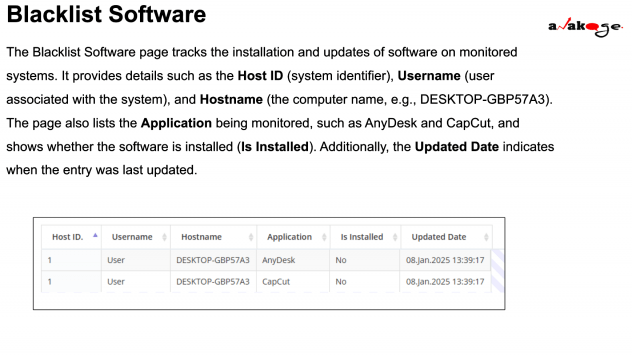
Blacklist Software monitoring helps track and manage the installation of specific applications on monitored systems. Organizations use this system to ensure unauthorized or restricted software is not installed on company devices.
For example, if an organization wants to prevent the use of remote access tools like AnyDesk, it can monitor whether this software is installed on any company computer.
Key Features of the Blacklist Software Page
The Blacklist Software page provides a structured overview of monitored software with the following key fields:
| Field | Description |
|---|---|
| Host ID | A unique identifier for each monitored system, helping IT teams track devices in the network. |
| Username | The name of the user associated with the monitored system. |
| Hostname | The computer’s unique name (e.g., DESKTOP-GBP57A3). |
| Application | The name of the software being tracked (e.g., AnyDesk, CapCut). |
| Is Installed | Indicates whether the software is currently installed (Yes/No). |
| Updated Date | The last time the software status was checked or updated. |
Why is Blacklist Software Monitoring Important?
Enhances Security – Prevents unauthorized software that might contain malware or security risks.
Ensures Compliance – Helps organizations enforce software policies.
Reduces IT Workload – Automates monitoring instead of manually checking each system.
Prevents Unauthorized Access – Blocks remote access tools like AnyDesk, which hackers might use.