
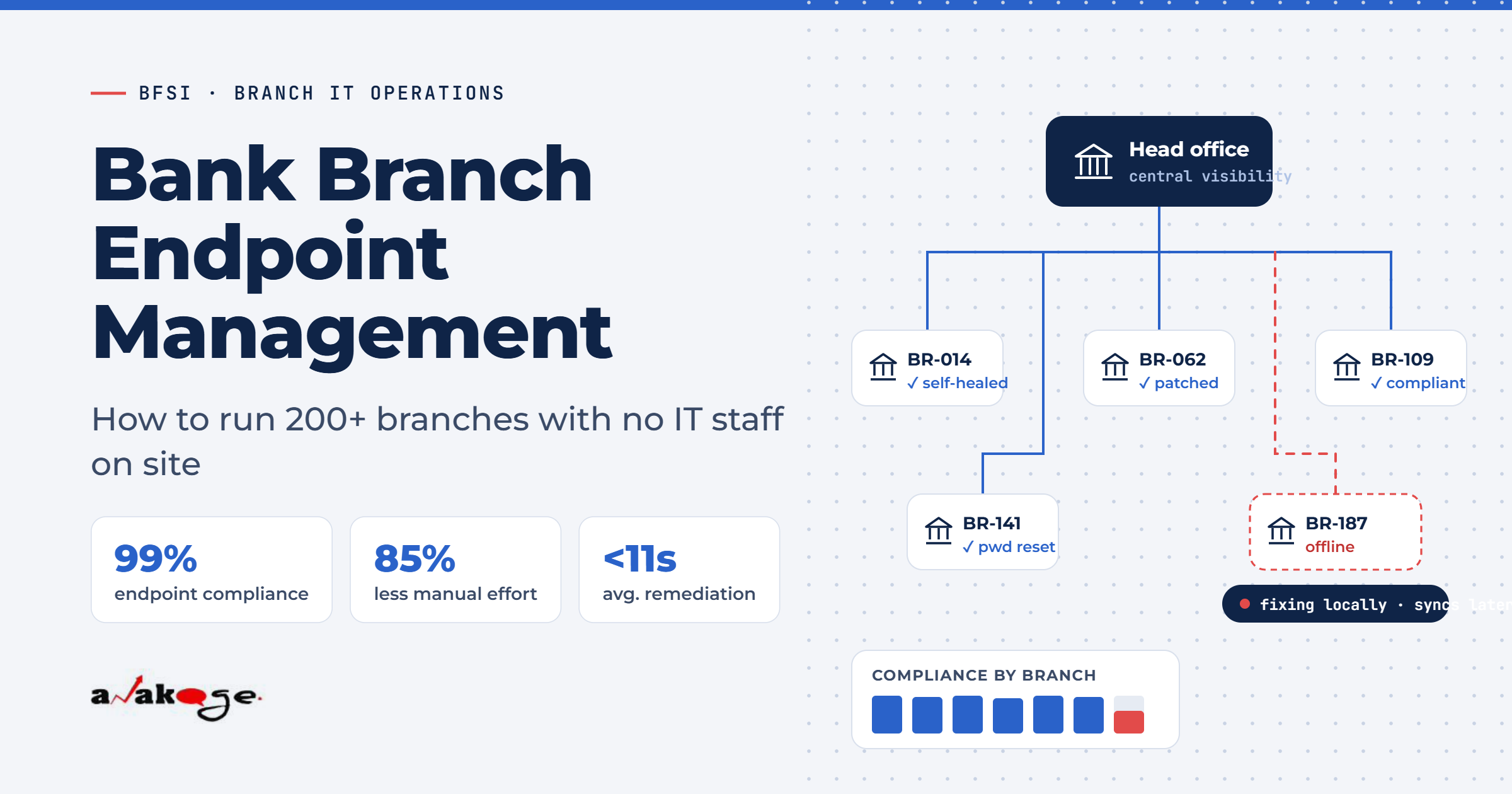
Bank branch endpoint management works when the endpoint can fix itself without waiting for head office. Branches have no local IT staff, variable connectivity and the same compliance obligations as your corporate campus. Any approach that depends on a technician travelling to site will not scale past about 50 branches.
One Indian private bank moved endpoint compliance from 90–95% under manual effort to close to 100% automated, cutting manual work by 85%. (Source: Anakage bank case study)
That gap between 95% and 100% is where audit findings live.
Why Branches Break Standard Endpoint Tools
Most endpoint management platforms make three assumptions. All three fail at a branch.
Assumption one: stable connectivity. Branch links are thin and shared with core banking traffic. A patch cycle that works in head office times out at a branch.
Assumption two: someone technical on site. Branch staff are tellers and relationship managers. Nobody there can run a command or read a log.
Assumption three: the user can raise a ticket. If the machine will not boot or the account is locked, the user cannot reach the portal to report it.
Remove those three assumptions and your design changes completely.
Step 1 — Get Visibility That Survives Disconnection
You cannot manage what you cannot see, and branches drop off the network regularly.
Your telemetry needs to collect locally and sync when the link returns. One BFSI insurer runs compliance visibility across 15,875 devices, with dashboard views covering service status and patch adherence even when endpoints are offline. (Source: Anakage insurer case study)
Three things to track per branch:
- Patch and group policy adherence
- Essential service status, such as antivirus and spooler
- Disk utilisation and device health
Report these by branch, not as an estate-wide average. An average of 96% hides twelve branches sitting at 60%.
Step 2 — Fix the Top Five Repeat Issues First
Pull 90 days of tickets from your ITSM tool and group by branch and category. The same issues dominate almost every bank.
In live deployments, the recurring set is consistent:
- Account lockouts and password resets
- Disk full and slow performance
- Print spooler failures
- Group policy out of sync
- Antivirus or agent stopped
One insurer cleared 184 TB of junk data and ran over 2 million group policy updates through automation. (Source: Anakage insurer case study)
An automotive manufacturer with a similarly distributed estate ran 3,350 automated fixes and cleared 131 TB. (Source: Anakage manufacturing case study)
Those numbers are not achievable by dispatching engineers.
Step 3 — Automate What Needs No Human Judgement
Self-heal means the endpoint detects a known condition and fixes it locally, without a ticket and without head office involvement.
Good first candidates for branches:
- Restart a stopped antivirus or spooler service
- Clear disk space when free space drops below a threshold
- Force a group policy refresh when out of sync
- Reinstall a corrupted management agent
- Trigger a pending reboot after patching
The bank deployment above used exactly this pattern. Automated compliance checks detected non-compliant endpoints, then self-healing restarted critical services and reinstalled corrupted agents. (Source: Anakage bank case study)
Note one constraint specific to BFSI. Most Indian banks prohibit PowerShell on endpoints under security policy, which rules out many automation tools outright. Verify scriptless execution before you buy.
Step 4 — Give Branch Staff Something They Can Actually Use
Branch users will not read a knowledge base article. They will call.
Two things change that.
Self-service password reset that works from the login screen. A locked-out teller cannot open email or a web portal. The reset option must be on the lock screen itself. One insurer ran 2,780 password resets and 10,581 reboots through user-facing campaigns. (Source: Anakage insurer case study)
Guided fixes inside the application. Step-by-step prompts on screen, in the branch staff member’s own language, beat any article.
Adoption benchmarks from live deployments: 70% to 81% of issues resolved by users without IT, with self-help success rates around 72%. (Sources: Anakage insurer and manufacturing case studies)
Step 5 — Handle Software Installs Without a Site Visit
Every branch software request that needs SCCM packaging is a delay measured in days.
One Japanese multinational running 3,000 workstations across 50 remote offices automated 70% of software install requests, and cut ad hoc requests by 50%, by removing the SCCM packaging step entirely. (Source: Anakage software install case study)
Pre-approve a catalogue per role. A branch manager and a teller need different things. Let them install from that catalogue without a ticket.
Step 6 — Produce Compliance Evidence Per Branch
Your auditor will not accept an estate-wide number. They will ask about a specific branch on a specific date.
Build reporting that answers three questions for any branch:
- What was the patch and policy status on this date?
- Which non-compliant endpoints were detected, and when were they fixed?
- What software is installed that should not be?
One insurer reported a threefold acceleration in compliance audit readiness after automating this reporting. (Source: Anakage insurer case study)
Keep the remediation log. Detecting non-compliance matters less than proving you closed it.
What Good Looks Like: Benchmarks
| Metric | Benchmark from live deployments |
|---|---|
| Endpoint compliance | 99–100% |
| Reduction in manual compliance effort | 85% |
| Issues self-resolved by users | 70–81% |
| Self-help success rate | 72% |
| Automated fix success rate | 80% |
| Average remediation time | Under 11 seconds |
| Ticket volume reduction | 44% |
| Software installs automated | 70% |
(Sources: Anakage bank, insurer, manufacturing and software install case studies)
Remediation cycles of 45 to 90 minutes per issue are common before automation. That is the number to compare against.
A Realistic Rollout Sequence
Do not start with all 200 branches.
- Pick 10 branches covering your worst connectivity and your busiest
- Deploy visibility only, for two weeks, and find the real top five issues
- Automate those five
- Add self-service password reset
- Expand in waves of 25 to 50 branches
Expect first measurable results in six to eight weeks. Full estate coverage typically takes three to six months.
FAQ
Q: How do banks manage IT across hundreds of branches?
A: The workable model is local automation with central visibility. Endpoints detect and fix common issues themselves, while head office monitors compliance per branch. Dispatching engineers does not scale past roughly 50 sites.
Q: How many endpoints can one IT admin realistically manage?
A: It depends far more on automation than headcount. Deployments where 70% of issues self-resolve let the same team cover several times more endpoints. Without automation, the practical ceiling is a few hundred devices per admin.
Q: How do you patch branches with poor connectivity?
A: Use local caching and staged deployment so branches pull once rather than each device pulling separately. Track patch adherence per branch, since an estate-wide average hides the branches that are failing.
Q: What happens when a branch loses connectivity?
A: A well-designed agent continues to detect and remediate locally, then syncs its telemetry when the link returns. If your tool needs a live connection to function, branches go unmanaged during every outage.
Q: How do banks prove endpoint compliance to RBI?
A: Auditors want branch-level evidence, not averages. Keep records of what was detected, when it was remediated and what remains open. Automated remediation logs make this far easier than manual attestation.
Q: Can endpoint automation work if PowerShell is blocked?
A: Yes, but not with every tool. Most Indian banks restrict PowerShell under security policy. Ask any vendor to demonstrate a remediation live with scripting disabled.
Q: How long does a multi-branch rollout take?
A: Plan six to eight weeks for first measurable results on a pilot group, then three to six months for full coverage. Starting with your top five issues is faster than attempting full coverage at once.
Closing
Bank branch endpoint management scales only when the endpoint stops depending on head office. Automate the five issues that generate most of your branch tickets, then expand.
If PowerShell is restricted in your environment or branch connectivity is unreliable, the tool options narrow quickly. The Anakage team runs a 30 minute walkthrough for banks managing distributed branch estates at https://anakage.com/contact-us.html