

How to Securely Execute Scripts (PS1, BAT) Across Endpoints
Secure script execution across enterprise endpoints requires centralized control, least-privilege access, and auditable workflows. Instead of relying on ad hoc PowerShell or BAT files, IT teams can use a low-code automation platform like Anakage Authoring Studio, which enforces encryption, RBAC, simulation, and full execution logs to ensure scripts run safely across hybrid environments.
Why Script Execution Security Matters
Scripts, especially PowerShell (PS1) and Batch (BAT) are essential tools for IT operations. They automate tasks such as system remediation, software installation, and configuration updates. But unmanaged script execution poses serious risks:
- Malware injection: Attackers can disguise malicious code as legitimate scripts.
- Privilege escalation: Scripts executed with excessive rights may compromise entire networks.
- Human error: A small typo in a manual script can bring down critical systems.
Regulatory frameworks like ISO 27001, SOC 2, and NIST now emphasize centralized control and auditability of administrative actions, including script execution. For IT leaders, secure script management isn’t optional — it’s a compliance and business continuity requirement.
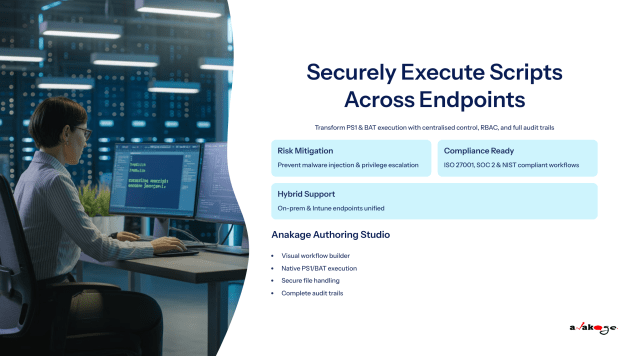

Common Pitfalls in Traditional Script Execution
Despite the risks, many IT teams still depend on traditional methods:
- Manual execution via RDP sessions or local logins.
- Shared admin credentials or overly broad execution rights.
- No monitoring or version control, making it hard to track who ran what.
- Bottlenecks created by reliance on scripting specialists for every automation.
This creates a fragmented, high-risk environment where errors and security breaches become inevitable.
Principles of Secure Script Execution
To minimize risk, enterprises should adopt a governed, automated approach built on these principles:
- Least Privilege & RBAC
Assign minimal rights for script execution. Role-Based Access Control (RBAC) ensures only authorized users or workflows can run scripts. - Code Integrity & Verification
Enforce the use of signed or hashed scripts to prevent tampering. - Controlled Distribution
Ensure scripts are delivered securely to endpoints via encrypted channels and agent-based mechanisms. - Audit & Logging
Capture detailed execution logs for compliance, troubleshooting, and forensic analysis. - Rollback & Recovery
Plan for contingencies with rollback workflows if a script introduces instability.
How Anakage Authoring Studio Enables Secure Execution
The Anakage Authoring Studio, part of our next-generation IT automation platform, provides a purpose-built solution for secure script execution:
- Unified Workflow Builder
Create secure, multi-step execution flows without writing code. Admins can design condition-based automations (e.g., If CPU usage > 90%, then run cleanup script).
- Deep Endpoint Integration
Unlike API-only tools, Anakage executes PS1, BAT, and EXE scripts natively on agent-managed devices, eliminating the need for elevated manual permissions.
- Secure File Handling
Upload and run scripts as part of a headless, sandboxed flow. Files are transferred securely, executed only under defined conditions, and fully tracked.
- RBAC & Audit Logs
Every execution is governed by role permissions and logged step-by-step, providing compliance-ready evidence.
- Hybrid Deployment Readiness
Built for modern enterprises, Anakage workflows support both on-prem endpoints and Microsoft Intune-based devices in hybrid estates.
- Cloning & Simulation
Test workflows in a simulated environment before deployment, ensuring safety and reducing the risk of outages.
Example Use Cases
- Automated Remediation: Trigger a disk cleanup script if storage falls below a threshold.
- Secure Onboarding: Bundle script execution with software installs and compliance checks in one flow.
- Patch Deployment: Use controlled scripts for pre/post-patch validation with rollback options.
Best Practices for IT Leaders
To maximize security and efficiency, CIOs and IT managers should implement these best practices:
- Approval Workflows: Require peer or manager sign-off before scripts are promoted to production.
- Script Library: Maintain a central repository of vetted, signed scripts with metadata.
- Simulation First: Always test scripts in a controlled environment before rollout.
- Audit Integration: Feed execution logs into SIEM or compliance systems.
- Periodic Review: Regularly reassess RBAC rules, script library, and automation policies.
By combining these practices with Anakage’s no-code/low-code execution model, IT leaders can scale automation without increasing risk.
Conclusion
Secure script execution is no longer just a technical concern — it’s a cornerstone of modern IT governance. Relying on manual PowerShell or BAT execution creates blind spots that attackers can exploit.
By adopting Anakage Authoring Studio, IT teams can enforce centralized control, reduce security risks, and accelerate service delivery. This directly supports the broader theme from our article [ The Guide to Low-Code/No-Code Platforms for IT Automation ], that visual, workflow-driven automation is the key to building IT environments that are safer, faster, and more accessible.
Ready to secure your IT automation?
[Schedule a Personalized Demo Today]
Have you read about our last release? Click here to read!
Frequently Asked Questions (FAQs)
- Q: Why is script execution risky in enterprise environments?
A: Because manual execution or unsecured distribution can expose endpoints to malware, privilege misuse, and compliance violations. - Q: Can Anakage run existing PowerShell or BAT scripts?
A: Yes. Existing scripts can be securely integrated into workflows with RBAC, full audit logs, and native agent-based execution. - Q: How does this approach help with compliance?
A: Every execution is logged, role-controlled, and auditable, helping enterprises meet ISO, SOC, and NIST requirements. - Q: Is this suitable for hybrid environments?
A: Yes. Anakage supports on-prem and cloud-managed (Intune) endpoints, ensuring seamless execution across hybrid estates.