


Update Java with Internet Explorer, to reduce bugs and slowness of the system. In this blog you will learn how to update Java using Internet Explorer.
Contents
Environment:
Java Update
Solution:
First, determine what Java version you have by following these steps
- In the search window on the left-hand side of the taskbar, input “Control Panel” and hit “Enter”:


- Choose “View by: Small (or Large) icons” and Double-click the “Java” symbol to open
- Click the “About…” button on the “General” menu. The “About Java” window will display the Java version you have installed (e.g., “Version 7 Update 71”).
- The Java Control Panel must be closed before the Control Panel can be closed.
Uninstall any version other than Java 8, Update 121 if you have one.
- Select “View by: Small (or Large) icons” in the Control Panel, then double-click on Programs and Features.
- In the list, look for Java. Two Java applications are installed on most PCs.


- Select one of the Java apps from the list, then click Uninstall.
- When you’re prompted if you’re sure you want to uninstall it, select Yes.
- Select Yes when prompted, “Do you want to enable the following programme to update software on this computer?”
- Select Yes when prompted, “Do you wish to allow the following application from an unknown publisher to make changes to this computer?”
- To remove the second Java software, repeat the procedures above.
Download the latest Java Update
- Type “Internet Explorer” into the search box to launch Internet Explorer.
- Use the internet Then go here to get the latest version of Java. Click the blue “Download” button once you’ve clicked the link.
- If Internet Explorer prompts you to “Run or save jre-8u121-windows…,” select “Save.”
- At the bottom of the page, look for the statement “The jre-8u121-windows-i586.” “View downloads” should be selected.
Installing the Java Update
- Click “Run” on the “jre-8u-121-windows” download in the “View Downloads – Internet Explorer” box to install the Java software.
- If prompted, “Do you want to allow this app to make changes to your device?”, click “Yes.”
- Click “Install” in the “Welcome to Java” window.
- If the warning “Out-of-Date Java Versions Detected” displays, uncheck the box next to the Java version shown, then click “Remind Me Later,” then “Next.”
- Uncheck the option if you’re asked if you wish to reinstate Java security prompts.
- Close the “Verify Java Version” popup if it appears.
- Click “Close” if the “You have successfully installed Java” dialogue appears.
- If a “Verify Java Version” popup appears, click it.
In the Java Control Panel, go over a few Java options. If required, make the following changes:
- Go to the Java Control Panel.
- To open Java, double-click on the icon.
- Select the “Update” tab from the drop-down menu.
- “Check for Updates Automatically” should be unchecked.
- Select “Do Not Check” from the drop-down menu.
- Select “Apply” from the drop-down menu.
- Select “Advanced” from the drop-down menu.
- Select “Do not start console” from the “Java Console” option.
- If the second option (“Enable – hide warning and run with protection”) is not already chosen in the “Mixed code (sandboxed vs. trusted) security verification” section, choose it.
- Make sure that only the options shown in the screenshot below are selected in the “Advanced Security Settings” section:

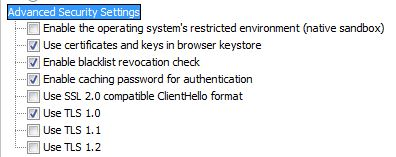
- Click “Apply”.
Keep the Java Console open and proceed with the steps below.
- Select the “Security” tab from the drop-down menu.
- Make sure “High” is selected as the security level. (If required, select “High.”)
- Click “OK,” then “OK” one more time.
Conclusion:
The above steps can help resolve “How to Update Jave through IE” in windows system, depending upon the engineer or a user could follow the above steps to resolve the issue.
The Anakage platform can help resolve issue using “Offline Cobot” which has catalogue of one click and user guided solution and can easily fix the issue “Java Update “keeping the engineer or the user at bay.
You just sit and relax and let our “Offline Cobot” do the job of you. Watch the video to know more.
There is much more you can automate, check out our website for more details.
Would you want your users to self-resolve such issues?
Please fill up this form, let us connect and walk you through IT Help Desk Automation use cases.
Read More:
HOW TO SPEED UP THE SYSTEM BY CLEARING UP DISK SPACE ?
HOW TO BACKUP USER DATA FILES IN WINDOWS ?
HOW TO FIX AUDIO ISSUES IN WINDOWS PC OR LAPTOP ?
HOW TO RESOLVE BROKEN IMAGES IN EMAIL BODY ?
HOW ACCOUNT LOCKOUTS FOR VARIOUS CREDENTIALS CAN BE RESOLVED