


Issue:
You can troubleshoot audio issues in windows very conveniently. In this blog you will learn how to troubleshoot audio issues in windows.
If you’re having trouble hearing sound from your computer, use the Windows Audio Troubleshooter to help you detect and fix any problems. It examines your volume controls, sound card or driver, and speakers or headphones for common issues. To initiate the troubleshooter, take these steps:
Environment:
Audio
Resolution:
- Step 1: Open the Start screen by pressing the Windows key.
- Step 2: Search for “troubleshooter”.

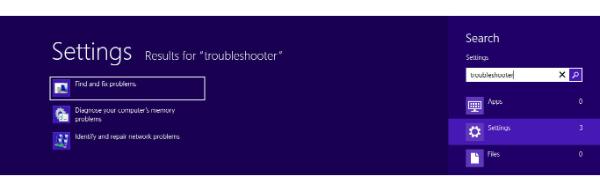
- Step 3: Click on “Settings” from under the search field.
- Step 4: Click on “Find and Fix problems” from the options visible.
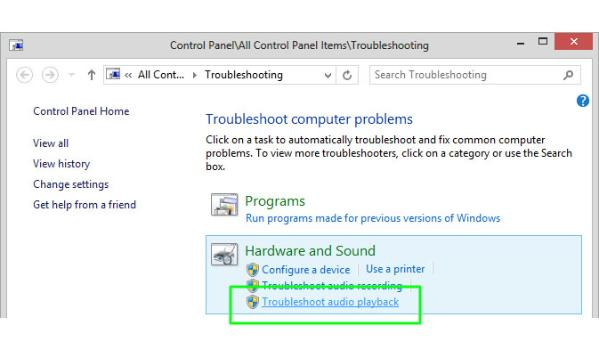
- Step 5: Click on “Troubleshoot audio playback” under “Hardware and Sound” under the Troubleshooting section in the Control Panel.

- Step 6: The “Playing Audio” troubleshooter will pop up. For problems to be fixed automatically you can click on”Advanced” and check the box to fix problems automatically. Click on”Next” to continue.

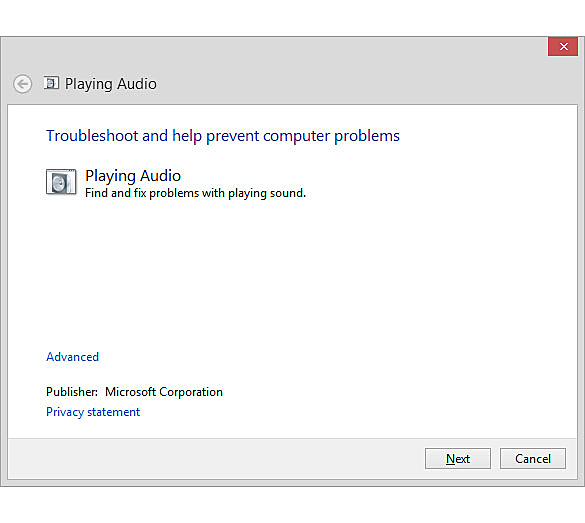
- Step 7: The troubleshooter will check for sound-related problems, inform you of any issues, and assist you in resolving them. The troubleshooter will also alert you if no problems are discovered.
If your computer still won’t produce audible sounds, there are a few basic measures you may take to try to fix the problem. This does not include sound issues caused by third-party audio software or hardware, such as surround sound speaker systems. If you have speakers, make sure they’re switched on and plugged into a working power source. Connecting headphones is the simplest method. If the headphone function but the internal speakers don’t, the computer may believe the headphones are plugged in when they aren’t. Most computers automatically cut the sound to the speakers when you plug in headphones. Connect and unplug the headphones several times. This will displace any dust that has accumulated in the headphone port.
Conclusion:
The above steps can take 5 to 10 minutes depending on the engineer. The Anakage Cobots can “Troubleshoot Audio issues in Windows” using both Portal or the Desktop Application (Agent) at the end point.
The admin can view user analytics from the admin dashboard, and can monitor which solution has been run by the user successfully and which has been not.
There is much more you can automate, check out our website for more details. Click here to see a video on “Fixing Skype audio issue” , which is an agent at the end point that can troubleshoot without providing admin access to the users.
Would you want your users to self-resolve such issues?
Please fill up this form, let us connect and walk you through IT Help Desk Automation use cases.
Read More:
HOW TO SPEED UP THE SYSTEM BY CLEARING UP DISK SPACE ?
HOW TO BACKUP USER DATA FILES IN WINDOWS ?
HOW TO FIX AUDIO ISSUES IN WINDOWS PC OR LAPTOP ?
HOW TO RESOLVE BROKEN IMAGES IN EMAIL BODY ?
HOW ACCOUNT LOCKOUTS FOR VARIOUS CREDENTIALS CAN BE RESOLVED