


Many people have complained about being unable to open hyperlinks delivered over email. Further analysis revealed that the problem was limited to the MS Outlook software rather than the mail server. Here’s how to get things fixed.
Contents
1. Make Microsoft Edge your default browser
- Step 1: Open Microsoft Edge.
- Step 2: Press Alt + f to access the browser menu options.
- Step 3: Choose Settings from the drop-down menu.
- Step 4: Select Default browser.
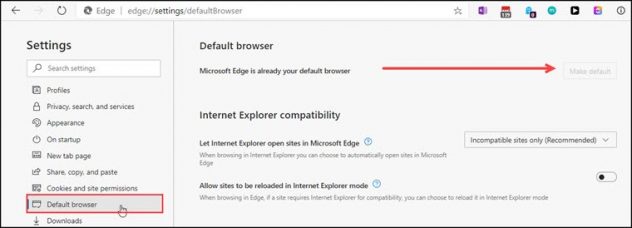

- Step 5: If Microsoft Edge is not set as your default browser, click on the Make default button located at the top.
- Step 6: Close the Settings window
- Step 7: Test a hyperlink and check if the error is rectified.
2. Check HTTP file associations,
- Step 1: Press Windows key + i to launch the Settings panel.
- Step 2: In “Find a setting” enter protocol.
- Step 3: Click on Choose a default app for each protocol.
- Step 4: Scroll down to HTTP and HTTPS.
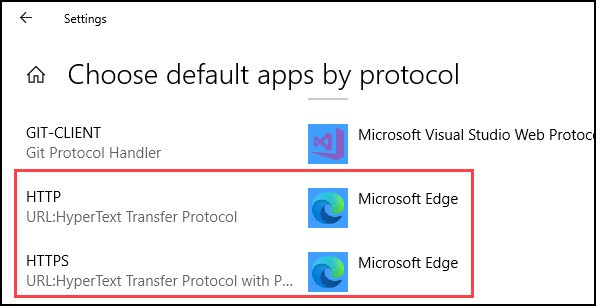

- Step 5: Set the default app to Microsoft Edge.
- Step 6: Check if hyperlinks open now.
3. Edit Registry Key
- Step 1: Open the CMD window by right-clicking on it and selecting Run as Administrator.


- Step 2: Enter the following commands one by one:
REG ADD HKEY_CURRENT_USER\Software\Classes\.htm /ve /d htmlfile /f
REG ADD HKEY_CURRENT_USER\Software\Classes\.html /ve /d htmlfile /f
REG ADD HKEY_CURRENT_USER\Software\Classes\.shtml /ve /d htmlfile /f
REG ADD HKEY_CURRENT_USER\Software\Classes\.xht /ve /d htmlfile /f
REG ADD HKEY_CURRENT_USER\Software\Classes\.xhtml /ve /d htmlfile /f
Step 3: Relaunch Outlook.
Conclusion
The above steps can help resolve “How to resolve Outlook hyperlink not opening” in windows system, depending upon the engineer or a user could follow the above steps to resolve the issue.
The Anakage platform can help resolve issues using “How to resolve Outlook hyperlink not opening” which has catalogue of one click and user-guided solutions and can easily fix the issue “How to resolve Outlook connection issue” keeping the engineer or the user at bay.
Click here to see a video on “How Anakage can Help Install Software”
There is much more you can automate, check out our website for more details.
Would you want your users to self-resolve such issues?
Please fill up this form let us connect and walk you through IT Help Desk Automation use cases.
Read More:
Case study On Digital Transformation.
Case Study on Automate Software Install requests.