


Issue:
Manage DNS using host file in windows to map the domain names, In this blog you will understand how to manage DNS using host file in windows.
You can override the domain name system (DNS) for a domain on a specific machine by editing your host file. When you wish to test your site without the test link before going live with SSL, verify that an alias site works before making DNS changes, and for other DNS-related reasons, DNS management using host file entry comes in handy. When you make changes to your host file, your local machine will look directly at the IP address you designate. Follow the steps below to locate and edit the host file on Windows.
Environment:
Domain Name System (DNS)
Solution:
- Step 1: Press the Windows key and go to the search field
- Step 2: Look for the Notepad application
- Step 3: Right-click Notepad and click on Run as administrator.
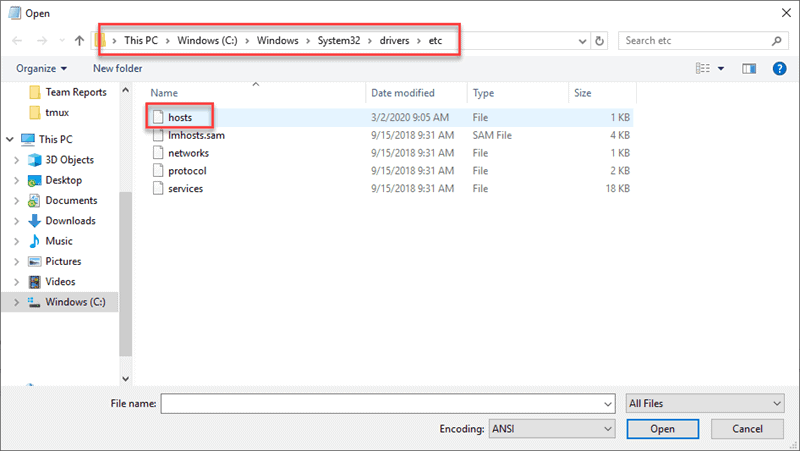
- Step 4: In Notepad, open the following file: c:\Windows\System32\Drivers\etc\hosts

- Step 5: Make the changes required in the file.

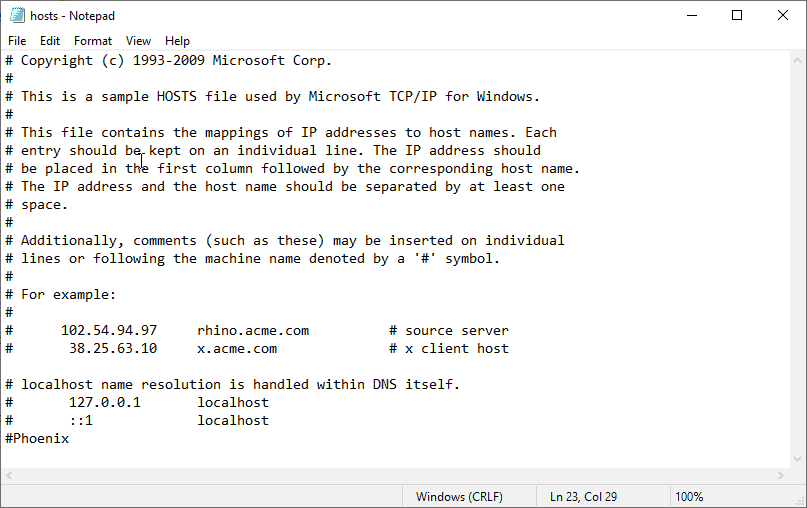
- Step 6: Go to File > Save to implement your changes.
If you’re doing testing on your network, editing your host file can come in handy. You can avoid the process of a web browser and do a Domain Name Server (DNS) search to
Conclusion:
From the above steps the engineer or the user can edit the host file from the system and can test the website before going live. Anakage Offline Cobot which has catalogue of one click solution and user guided solution, can guide the user by opening the live application to “Manage DNS using system host file”.
Which could reduce the efforts of reading and following the steps for an engineer or for the user.
Click here to see a video on “Empowering ServiceNow Users with Powerful and Intelligent Self Help | Cobot” There is much more you can automate, check out our website for more details.
Would you want your users to self-resolve such issues?
Please fill up this form, let us connect and walk you through IT Help Desk Automation use cases.
Read More:
HOW TO SPEED UP THE SYSTEM BY CLEARING UP DISK SPACE ?
HOW TO BACKUP USER DATA FILES IN WINDOWS ?
HOW TO FIX AUDIO ISSUES IN WINDOWS PC OR LAPTOP ?
HOW TO RESOLVE BROKEN IMAGES IN EMAIL BODY ?
HOW ACCOUNT LOCKOUTS FOR VARIOUS CREDENTIALS CAN BE RESOLVED