


Issue:
Fix the calculator application in windows, In this blog you will learn How to fix the calculator application in windows to help you in numbers
We can help if your calculator is acting up, won’t open, freezes, or has other problems. You’ll find answers and solutions to fix the calculator in minutes in this blog.
Environment:
Windows Calculator
Cause:
- Calculator won’t open or launch: When individuals try to run the calculator program, it does not open. The program is completely unresponsive, with no indication that a process is about to begin.
- Calculator opens and closes immediately: There is a problem in which the calculator opens, but then closes again. This could be the result of corrupted files in your system.
- Calculator not working for one user or administrator: Some face an issue where the calculator only doesn’t work for one specific user or the administrator. This can be solved easily by following the steps outlined below.
- Calculator Crashes: The app unexpectedly crashes or closes, leading users to start over multiple times.
Resolution:
- Re-register Windows 10 apps via PowerShell
- Step 1: Press the Windows + S keys and type “PowerShell.”

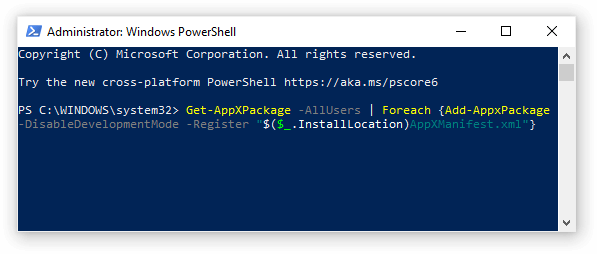
- Step 2: Right-click “Windows PowerShell” > Select “Run as administrator.”
- Step 3: If asked, click “Yes” to allow PowerShell to make changes on your PC”.
- Step 4: Once PowerShell opens, copy and paste the following script into it, and hit Enter: Get-AppXPackage -AllUsers | For each {Add-AppxPackage -DisableDevelopmentMode -Register “$($_.InstallLocation)AppXManifest.xml”}
- Step 5: These re-registers the Windows 10 apps, try opening the Calculator app again.
- Reset the Calculator app from your settings
- Step 1: Go to the Start menu and select “Settings.” You can also tap Windows + I to access Settings.
- Step 2: Click on the “Apps” tile and wait for all the installed applications to appear on the list. It could take a long time, if you have many apps installed
- Step 3: Type “calculator” to search for the app.

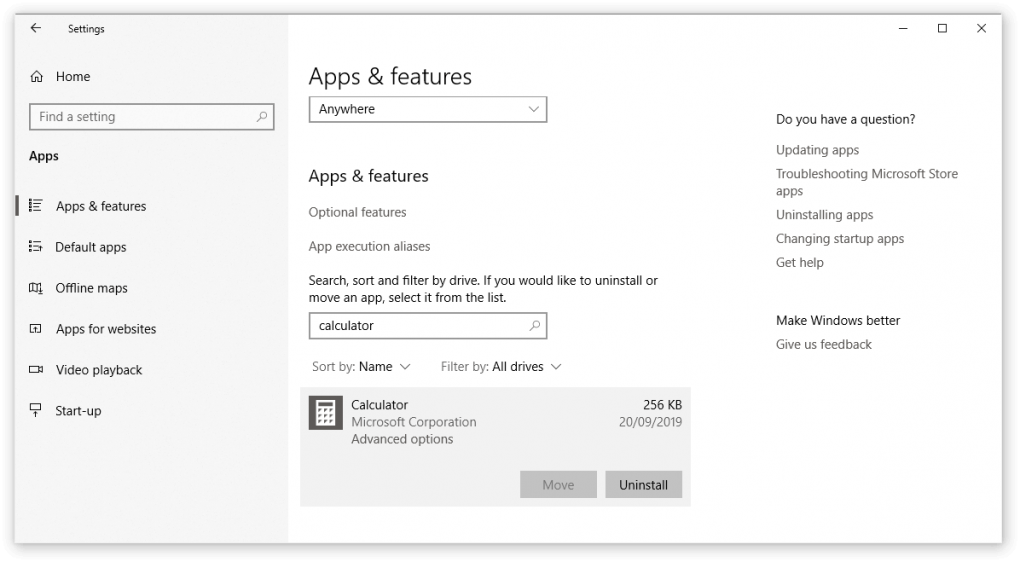
- Step 4: Click “Calculator” > “Advanced options”.
- Step 5: Click on the “Reset” button and wait for the reset process to complete.
- Reinstall the Calculator app
- Step 1: Go to the Start menu and select “Settings.” You can also tap Windows + I to access Settings.
- Step 2: Click on the “Apps” tile and wait for all the installed applications to appear on the list. It could take a long time, if you have many apps installed
- Step 3: Type “calculator” to search for the app.
- Step 4: Click on the “Uninstall” button.
- Step 5: Press the Windows + S keys and type in “Microsoft Store” and click on it.
- Step 6: Type in “calculator” in the search bar.

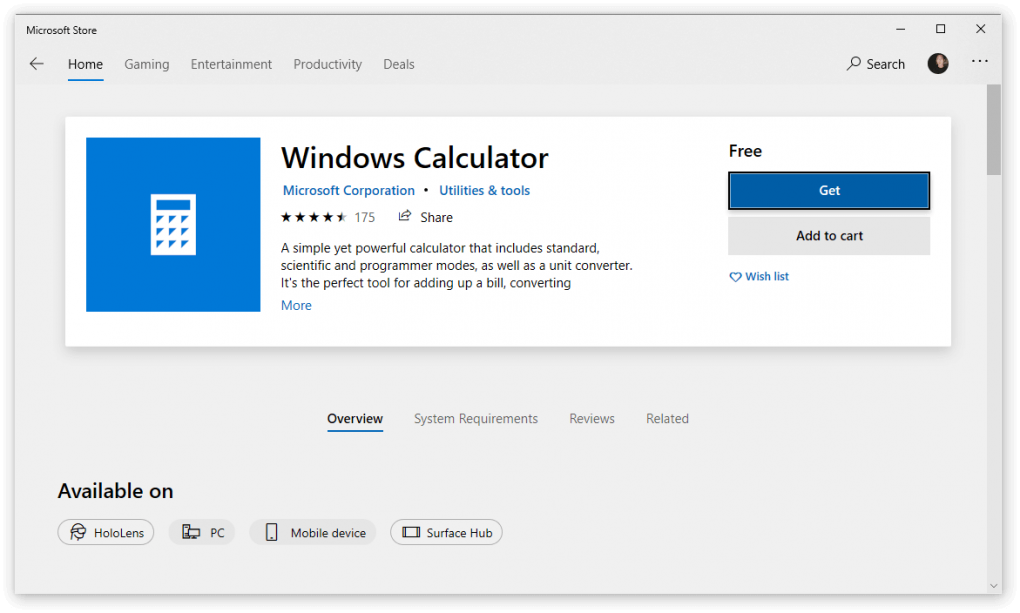
- Step 3: Choose “Windows Calculator” by Microsoft and select the “Get” button.
- Step 4: Click the “Install” button and launch the app once installation is complete.
- Run the System File Checker
The System File Checker (SFC scan) is an inbuilt tool. It’s the quickest way to automatically fix corrupted system files and other problems.
- Step 1: Press the Windows + R keys to bring up the Run window.
- Step 2: Type in “cmd” then press Ctrl + Shift + Enter keys to launch the Command Prompt with administrative authority.
- Step 3: If asked, click “Yes” to permit the Command Prompt to make changes on your PC.
- Step 4: Type in the following command and press Enter: sfc /scannow.

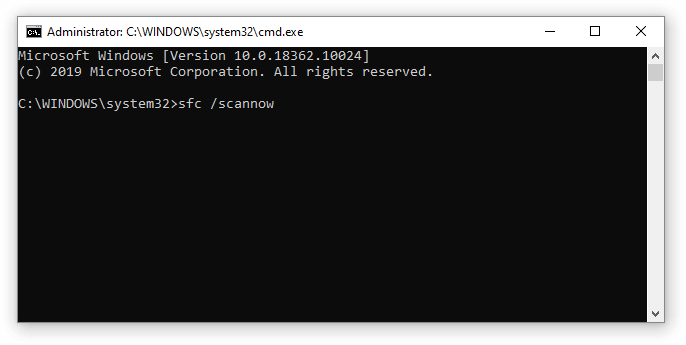
- Step 5: Wait for corrupt files to get repaired. This could take a long time. Don’t close the Command Prompt or shut down the PC until it completes.
- Step 6: Restart your PC
- Download the Windows App Troubleshooter
Windows 10 has many troubleshooters for users to automatically resolve issues. While the Windows Store Apps troubleshooter isn’t on your device by default, you can easily download it and run it to restore your Calculator app.
Here are the steps you need to follow:
- Step 1: Download the Windows Store Apps troubleshooter here.
- Step 2: Launch the troubleshooter
- Step 3: Select the “Advanced” link.
- Step 4: Check the “Apply repairs automatically” box, and click Next.
- Step 5: Allow the troubleshooter to do its work and identify any faults. The troubleshooter will instantly repair and restore your Calculator app if problems are discovered.
- Step 6: Close and launch the Calculator app again.
Conclusion:
The windows calculator application is very handy to use, with its various features and capabilities, but we as users tend to rely on it in an emergency task outbreak.
The Engineer can resolve various calculator issues by reinstalling the application or manually running the steps in sequential order as mentioned above.
Depending upon the User requirement, Anakage Cobots has multiple ways to resolve various issues related to “Calculator” using both Portal or Desktop Application (Agent) at the end point.
There is much more you can automate, check out our website for more details. Click here to see a video on “Offline Cobot”, which is a desktop application and has catalogue of “One Click” solution” along with “User Guided” solution.
Would you want your users to self-resolve such issues?
Please fill up this form, let us connect and walk you through IT Help Desk Automation use cases.
Read More:
HOW TO SPEED UP THE SYSTEM BY CLEARING UP DISK SPACE ?
HOW TO BACKUP USER DATA FILES IN WINDOWS ?
HOW TO FIX AUDIO ISSUES IN WINDOWS PC OR LAPTOP ?
HOW TO RESOLVE BROKEN IMAGES IN EMAIL BODY ?
HOW ACCOUNT LOCKOUTS FOR VARIOUS CREDENTIALS CAN BE RESOLVED