
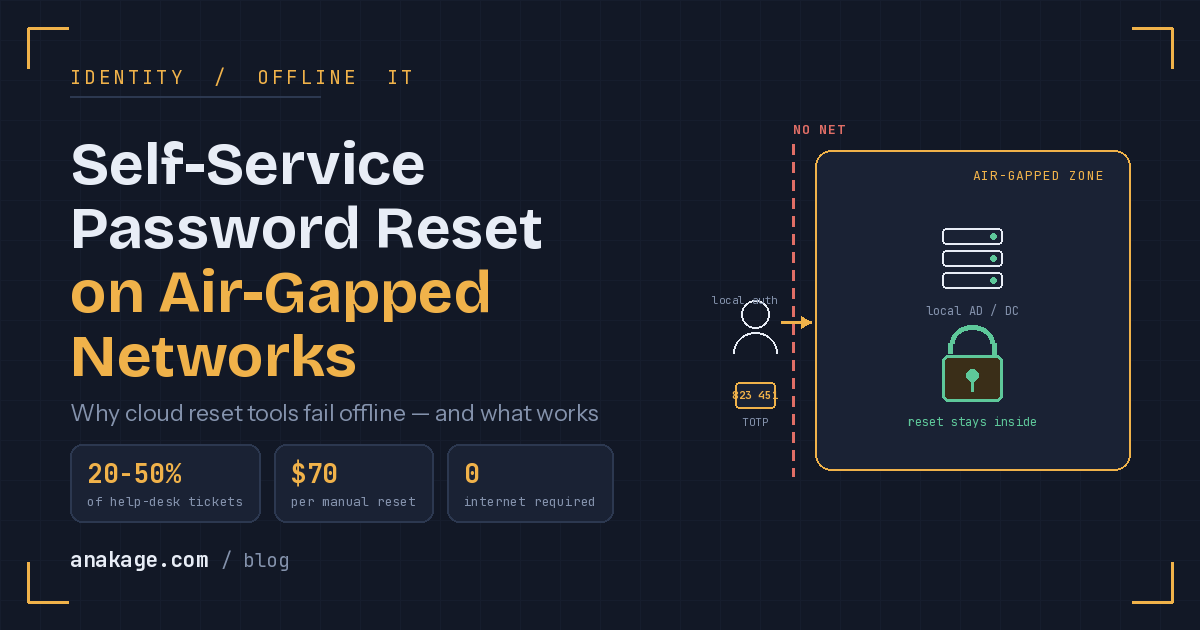
Self service password reset on an air gapped network requires an on-premise AD self service tool that verifies identity using cached credentials and offline factors like TOTP or hardware tokens. Cloud SSPR fails here because it needs internet access to a hosted service. On an isolated network, users authenticate against a local domain controller, with no external call at any step.
Password resets are the most common help desk ticket. On an air gap, they are also the hardest to automate. This guide explains how password self service works offline, and what actually delivers it.
What Is Self Service Password Reset (SSPR)?
Self service password reset (SSPR) — a system that lets users reset their own password after verifying identity, without help desk involvement.
In short, SSPR puts the reset in the user’s hands. They prove who they are, set a new password, and get back to work. No ticket, no waiting.
Most SSPR tools tie into Active Directory, which is why the term AD self service is common. The user resets their AD password through a self service portal or the login screen.
Why Password Resets Are Such a Big Problem
Forgotten passwords flood every help desk. The numbers are consistent across years of research.
Gartner has found that 20 to 50 percent of all help desk calls are password related. Forrester estimates each manual reset costs around $70 once you count staff time and lost productivity.
For a 1,000-person company, that is roughly $70,000 a year on resets alone. This is why password self service exists: it removes a repetitive, costly task from skilled IT staff.
SSPR is the standard fix. It cuts tickets sharply. But it usually assumes internet access.
Why Cloud SSPR Fails on an Air Gapped Network
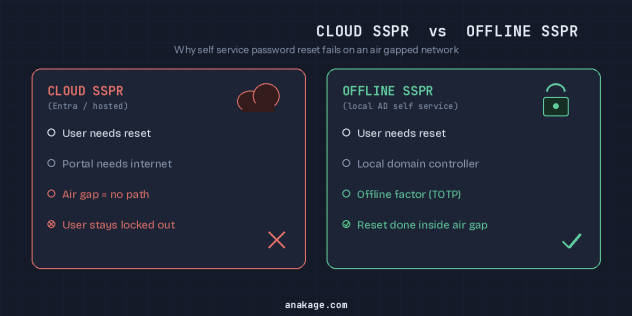
Most SSPR tools are cloud services. Microsoft Entra SSPR, for example, needs its hosted identity service to function.
On an air gapped network, there is no path to that service. The user is locked out, and so is the reset tool.
There is a cruel irony here. The moment a user most needs an SSPR password reset is when they cannot reach the network. If they cannot get online to use the portal, they cannot reset their own password.
This is the core gap. The standard cloud approach to self service password reset does not work across an air gap.
How AD Self Service Password Reset Works Offline
Offline reset moves identity verification inside the air gap. Nothing leaves the network.
The user authenticates against a local domain controller, not a cloud service. The second factor is something stored or generated on-device, not sent over the internet.
Here is the general flow for AD self service password reset offline:
- The user starts a reset at the login screen or a local self service portal.
- The tool verifies identity against the local Active Directory.
- A second factor is checked offline, such as a TOTP code or hardware token.
- The new password is set and synced to the local domain controller.
- The cached credential on the device is refreshed so the user can log in.
No step requires internet. Every check happens inside the isolated network.
Which Authentication Factors Work Offline
Not every factor works without a connection. SMS and email codes usually fail, because they need external delivery.
Factors that do work offline include TOTP authenticator apps, FIDO2 passkeys, smart cards, and other hardware tokens. These generate or hold the secret locally.
Cached credentials also matter. They let a user log in to a device even when the domain controller is briefly unreachable.
Keeping an Audit Trail for Compliance
In regulated environments, every SSPR password reset must be accountable. Auditors want to know who reset what, when, and from where.
Your offline AD self service tool should log each reset with the user, time, source device, and outcome. These logs become audit evidence for frameworks like RBI, ISO 27001, and NIST.
This matters even more on an air gap, where there is no cloud console recording activity. Build logging in from the start, not as an afterthought.
The Offline SSPR Tool Landscape Is Thin
General self service password reset is a crowded market. Narrow it to air gapped network support, and the field shrinks fast.
A few vendors handle offline MFA and AD self service password reset using local Active Directory and on-device factors. Dedicated identity tools in this space exist, but they are specialized and few.
Beyond pure reset, broader offline IT tools help reduce the surrounding ticket load. Self-healing and guided in-app resolution can resolve common access issues before they become a help desk call. Anakage is one option worth considering here, built for offline and air gapped enterprise environments where audit-ready logging and on-premise automation matter. It is not a dedicated password self service product, so pair it with an offline identity tool for the reset itself.
The honest takeaway: there is no single dominant offline SSPR solution. Evaluate against your exact factors, your domain setup, and your audit needs.
Frequently Asked Questions
Q: What is SSPR? A: SSPR stands for self service password reset. It is a system that lets users reset their own password after verifying their identity, without contacting the help desk. Most SSPR tools integrate with Active Directory for AD self service.
Q: Why does cloud SSPR fail on an air gapped network? A: Cloud SSPR needs internet access to a hosted identity service. An air gapped network has no path to that service, so the reset tool cannot function. Users are locked out of both the network and the reset portal.
Q: How do you do self service password reset with no internet? A: Use an on-premise AD self service tool that verifies identity against a local domain controller and checks an offline second factor. The new password syncs to the local Active Directory, with no external call required.
Q: Can you do MFA on an air gapped network? A: Yes. Offline MFA uses factors stored or generated on-device, such as TOTP apps, FIDO2 passkeys, smart cards, or hardware tokens. These work without internet because the secret never leaves the air gap.
Q: Which authentication factors do not work offline? A: SMS and email one-time codes usually fail offline, because they need external delivery networks. Stick to on-device factors like TOTP, passkeys, and hardware tokens for password self service in isolated environments.
Q: How do you keep an audit trail of offline password resets? A: Your AD self service tool should log each event with the user, timestamp, source device, and outcome. These records serve as audit evidence for compliance. Offline environments need this built in, since there is no cloud console logging activity.
Self service password reset on an air gapped network comes down to moving identity verification fully inside the isolation boundary, using local AD credentials and offline factors. Get that right and you cut your most common ticket without breaking the air gap.
If your team runs an offline or compliance-heavy environment and wants to cut the access-related ticket load with on-premise automation and audit-ready logging, Anakage offers a demo at anakage.com/book-a-demo — worth a look if that matches your setup.
Sources and References
- Microsoft Entra self-service password reset — how it works (Microsoft Learn) — confirms cloud dependency of Entra SSPR.
- Average organization saved $65K in 2023 with self-service password resets (Specops) — $70-per-reset cost and savings analysis.
- The Hidden Cost of Password Reset Tickets (Avatier) — Gartner 20–50% of help desk calls; HDI $70-per-reset figure.
Cost and volume figures originate from Gartner, Forrester, and HDI and are widely cited across the industry.