Have a Question?
Introduction
Anakage Module for Mac OS and Deployment Prerequisite
Components Installation Overview
When installing the Anakage components on a Mac machine, several directories will house the various parts of the system. These
components include the Anakage Agent (AnakageProactive), the Anakage Daemon (AnakageDaemonXPC), and the IT Self Service app.
Below is a breakdown of the directories involved and the specific files and applications they contain:
1. /Library/IAssist
This directory serves as the central repository for all Anakage-related components. It includes:
● Anakage Agent (AnakageProactive): Responsible for proactive system management tasks.
● Anakage Daemon (AnakageDaemonXPC): Handles background processes and system-level operations.
● IT Self Service App: The IT Self Service application for end-user self-service functionalities.
● Database: Contains necessary data files for the applications.
● Logs: Stores log files for troubleshooting and monitoring purposes.
● Plist Files: Configuration files in the plist format required for system and application settings.
2. /Library/LaunchDaemons
This directory contains the plist file for the Anakage Daemon:
● com.daemonxpc.service.anakage.plist: This plist file is responsible for launching and managing the AnakageDaemonXPC service
at system startup. It ensures the daemon runs with the necessary privileges and configurations.
3. /Library/LaunchAgents
Here, you will find the plist file for the Anakage Agent:
● com.anakage.proactive.agent.plist: This plist file manages the AnakageProactive agent, ensuring it launches correctly when a
user logs in. It handles user-level tasks and interactions.
4. /Applications
The Applications directory will contain the IT Self Service app:
● IT Self Service App: This application is installed here, providing users with a graphical interface to access self-service tools and support options.
By organising these components into the specified directories, the system ensures that each part of the Anakage solution is correctly placed and managed. This structure helps maintain a clean and efficient installation, facilitating easier updates and troubleshooting.
● /Library/IAssist: Central hub for all Anakage components.
● /Library/LaunchDaemons: Houses the plist for the AnakageDaemonXPC.
● /Library/LaunchAgents: Contains the plist for the AnakageProactive agent.
● /Applications: Location for the IT Self Service app.
Anakage Modules Overview
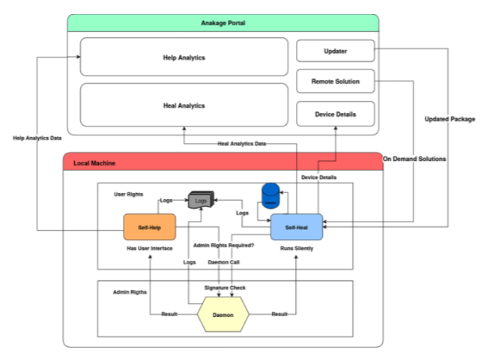
The Anakage system comprises several key modules designed to enhance the functionality and management of macOS machines. These modules include the Anakage Agent (AnakageProactive), the Anakage Daemon (AnakageDaemonXPC), and the IT Self Service App. Each module plays a specific role in ensuring seamless operation and support. Below is a detailed description of each module: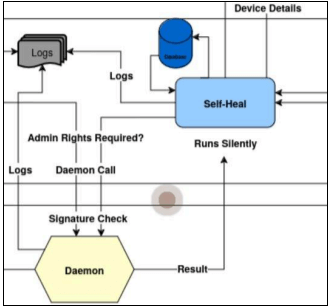
1. Anakage Agent (AnakageProactive)
Role: Background Agent Background
Operation: The agent runs silently in the background every 20 minutes.
Solution Management: Handles both remotely triggered solutions and those stored locally in the database.
Log Generation: Produces detailed logs each time it executes.
Analytics: Sends unique analytic results to the server, providing insights into system performance and issues.
Self-Update: Can automatically update itself along with other components such as the IT Self Service app and the database.
Identifier: com.ank.agent
2. Anakage Daemon (AnakageDaemonXPC)
Role: Background Daemon
Idle State: Remains in an OK state until called upon.
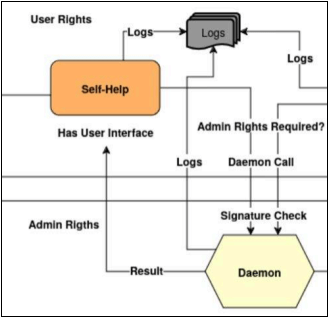
Admin Execution: Executes solutions with administrative rights and can be invoked by both the Agent and the IT Self Service app.
Security Layer: Verifies callers with the same signature as the daemon to ensure secure operations.
Response Handling: Sends responses back to the calling entity (Agent or IT Self Service app).
Communication: Utilises Mach services for communication with the caller, ensuring robust and secure interactions.
Identifier: com.ank.daemon
3. IT Self Service App
Role: Self-Help Application
Machine Information: Provides a detailed view of machine specifications and status.
Performance Graphs: Displays graphs for CPU, battery, network, and memory usage.
Action Cards: Offers action cards for performing direct tasks from within the app.
Crash Reports: Features an interface for reading crash reports.
System Logs: Includes an interface for accessing system logs.
Install History: Provides an interface for viewing the installation history.
User Guidance: Guides users in performing specific tasks after running a solution.
Feedback Collection: Asks for user feedback after the completion of each solution.
Dependency: Relies on the Agent Package for updates.
Identifier: com.ank.healit
The integration of these modules ensures a comprehensive and efficient system management solution for macOS machines:
● Anakage Agent (AnakageProactive): Automates background tasks, solution management, log generation, and analytics, with self-updating capabilities.
● Anakage Daemon (AnakageDaemonXPC): Provides secure, admin-level execution of solutions, with robust communication and response handling.
● IT Self Service App: Enhances user interaction with detailed system views, performance monitoring, direct task execution, and comprehensive support features
Prerequisite Permissions for Anakage Components
1. Accessibility Permission
Purpose: Certain Self-Heal solutions use AppleScript to interact with the UI, automating clicks and keystrokes on the screen.
● Required For: IT Self Service app
● Settings Path:
○ Go to Settings > Privacy & Security > Accessibility
○ Add IT Self Service
2. Full Disk Access
Purpose: Full Disk Access allows applications to access files and folders normally restricted by macOS security features. This permission is essential for tasks such as disk cleanup, disk space analysis, and accessing certain log files and system resources.
● Required For: IT Self Service app, Anakage Agent
● Settings Path:
○ Go to Settings > Privacy & Security > Full Disk Access
○ Click the + icon and select IT Self Service
3. Automation Permission
Purpose: Some solutions require control over other applications to automate specific tasks. Automation permission ensures these tasks can be performed without user intervention.
● Required For: Anakage Agent (AnakageProactive)
● Settings Path:
○ Go to Settings > Privacy & Security > Automation
○ Add AnakageProactive
4. System Event Permissions
Purpose: System Event permissions are necessary for the Anakage Agent to interact with system-level events and processes.
● Required For: Anakage Agent (AnakageProactive)
● Ensure Full Disk Access and Automation permissions are granted as described above
Summary of Required Permissions
To ensure all Anakage components operate effectively, please ensure the following permissions are granted:
● IT Self Service App:
○ Accessibility: Settings > Privacy & Security > Accessibility > Add IT Self Service
○ Full Disk Access: Settings > Privacy & Security > Full Disk Access > + Icon > Select IT Self Service
● Anakage Agent (AnakageProactive):
○ Full Disk Access: Settings > Privacy & Security > Full Disk Access > + Icon > Select IT Self Service
○ Automation: Settings > Privacy & Security > Automation > Add AnakageProactive
● Anakage Daemon (AnakageDaemonXPC):
○ Root permissions are required and must be configured during setup
System Requirements for Anakage Components
To ensure optimal performance and compatibility of the Anakage components on macOS machines, please review the following system requirements and hardware compatibility details:
1. Operating System Requirements
● Minimum macOS Version: macOS 11 Big Sur
● Supported Versions: All versions of macOS released after macOS 11 Big Sur are fully supported and compatible
2. Hardware Compatibility
● Processor Support:
○ Intel Chips: Fully supported
○ Apple Silicon Chips: Fully supported, including M1 and subsequent versions